What Is Photo Editing?

Today, we’re going to pull back the curtain on photo editing. Look, whether you’re trying to sell stuff online, you’re an artist wanting to master what photomanipulation is to get your images just right, or maybe you just want your vacation shots to look amazing, understanding what editing is can literally change the game for you.

When people ask what image editing is, they often think only of professional photo editing in computer setups using raster graphics editor software, but it’s so much more than that. It ranges from simple photo editing in Instagram to the high-stakes world of photo editing in journalism.

We often hear the term “photoshopped” defined, and while many wonder what photoshopping means exactly, it’s really about the power of raster image editing software to completely transform your images. Whether you are using a raster graphic editor for a complex project or looking for an iPhone photo editing definition for your mobile snaps, mastering these key tricks will elevate your work.

What We'll Cover Today

So here’s what we’ve got lined up. We’re going to start with the absolute basics. You know, what even is photo editing? Then we’ll get into the essential tools everyone should know.

  • What is photo editing (and why it matters)
  • Different types of photo editing, from simple to complex
  • Real-world examples of photo editing for portrait, sports, and product photography
  • Essential photo editing techniques and tips

From there, we’ll jump into some seriously cool pro-level techniques. And we’re not stopping there. We’ll look at how this stuff actually makes a difference in the real world and wrap it all up with a really important idea. It’s about enhancing, not just fixing.

What is photo editing?

So let’s get down to it. What are we actually talking about when we say photo editing? At its heart, it’s just the art of changing an image. And that can be something super simple, like just cropping it a little differently. Or it could be something way more complex, like completely getting rid of something you don’t want in the shot. No matter what, though, the goal is always the same: to make the image better, stronger, and more impactful.

The importance of photo editing

I mean, we’ve all been there, right? You take a picture, and it’s almost perfect, but something’s just not quite right. Maybe the lighting’s a little dark, or the framing is off, or there’s that one random thing in the background that’s totally distracting. Well, that’s where photo editing swoops in to save the day. It’s really the bridge between the photo you took and the awesome photo you saw in your mind.

Types of photo editing

Users discover many types of photo editing today. Simple kinds of photo editing require patience. People learn basic styles of photo editing alone. Complex types of image editing need specialized software. Professionals apply advanced photo editing techniques daily. You can explore different styles of photo editing for social media.

Specialized wedding photo editing techniques preserve memories. Many editors use creative photo editing techniques for art. Modern photo editing techniques utilize artificial intelligence. These photography editing effects transform simple pictures. Expert professional photo editing techniques ensure high quality.

●       Simple photo editing techniques include:

All right, first things first, let’s talk about the essential toolkit. Think of these photo editing basics as the simple powerhouse moves, from cropping techniques and image straightening to a perfect white balance that can make a huge difference on pretty much any photo you take.

Okay, so let’s break down these basics of photo editing fundamentals. You’ll want to master exposure correction and brightness adjustment to learn exactly how to brighten photos without washing them out. Then, move into color correction using saturation control and vibrance adjustment to make your hues pop. We’ll also look at contrast enhancement and how to use curves and levels for that professional punch. Finally, we’ll cover noise reduction and sharpness increase so you know exactly how to make photos clearer.

  • Straighten

Crop Shoes

You adjust the photo horizon. This tool fixes tilted images. Your picture looks balanced.
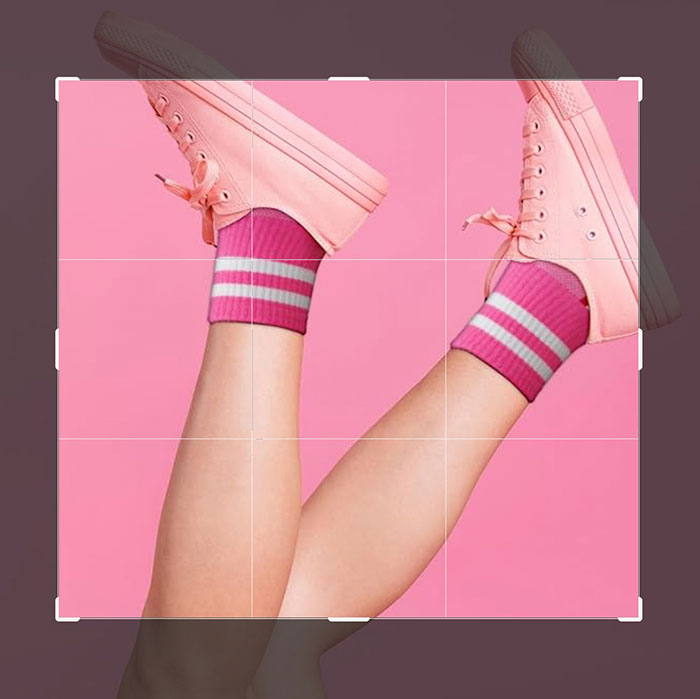
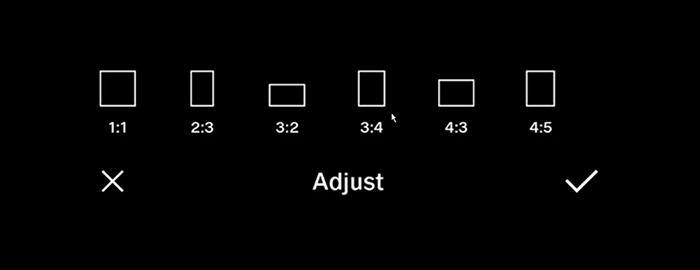
  • Crop

Crop Shoes

You trim the image edges. This action removes distractions. The subject gains more attention.

  • Resize

Resize

You change the image dimensions. This process alters the file size. Digital screens require specific widths.

  • Sharpen

You enhance edge definition. This tool adds clarity. Crisp details look more professional.

  • Noise reduction

You smooth the pixel grain. This step removes digital artifacts. Your photo looks cleaner.

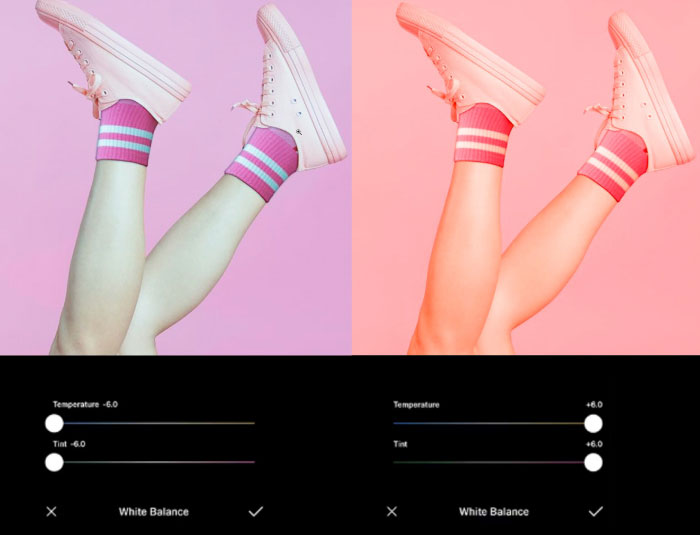
  • White balance

White balance

You set the light color. This adjustment fixes unrealistic tones. Skin looks natural.

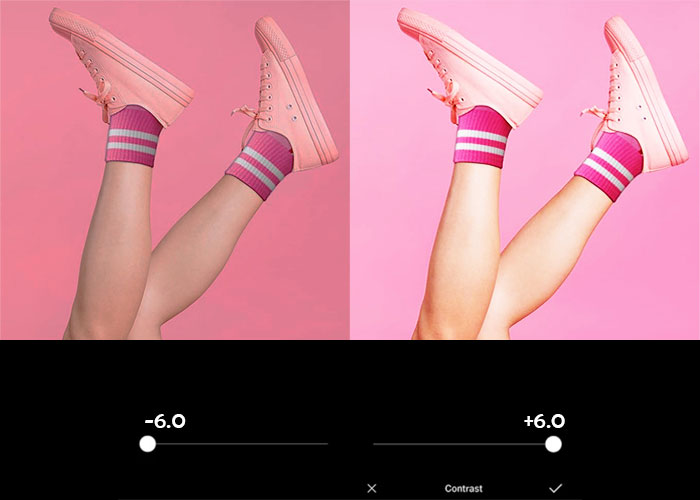
  • Contrast

contrast adjustment pink shoes

You change the light range. High settings add punch. Flat images gain new depth.

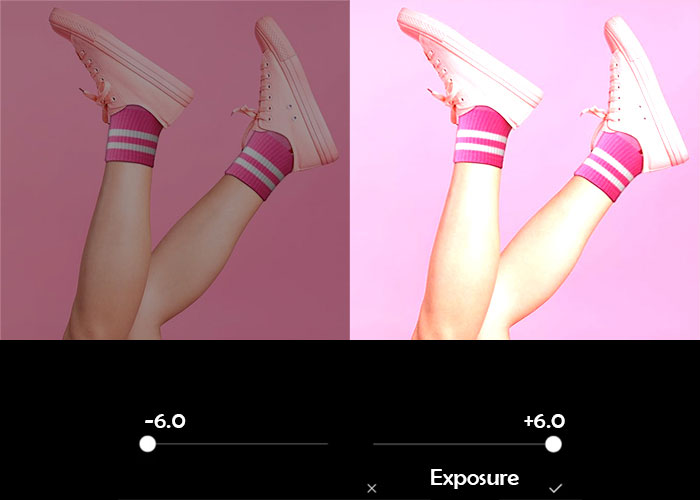
  • Exposure

exposure adjustment pink shoes

You control the image brightness. This setting fixes dark shots. Proper light reveals detail.

  • Lens correction

You fix optical distortions. This tool removes lens curves. Your lines look straight.

  • Color adjustments

You modify specific hues. This change alters item colors. The mood shifts instantly.

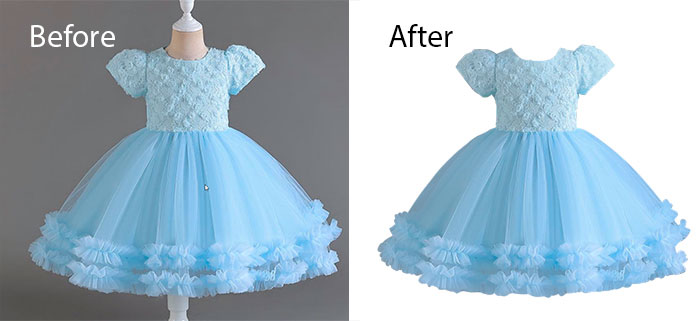
  • Background removal

Background removal dress

You delete the scene background. This action isolates the subject. Product shots look professional.

More complex techniques include:

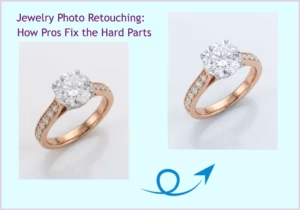
Now, let’s level up and unlock some of those photo retouching techniques. This is where we get into how the pros use photo editing techniques in Photoshop to get those absolutely flawless results.

Yeah, these take a bit more skill, but the amount of control they give you? It’s incredible. We’re talking about high-end portrait enhancement like frequency separation for perfect skin retouching and using dodge and burn to add depth. You can master portrait editing with a simple healing brush for blemish removal or even eye retouching and teeth whitening to make a subject truly pop.

Things like

  • Advanced Tools: Mastering the liquify tool for subtle shaping or the clone stamp and content-aware fill for seamless object removal, Photoshop style.
  • Precision Selections: Using the pen tool in Photoshop for a perfect clipping path or the magic wand tool in Photoshop for quick background removal.
  • Creative Control: Learning layer masking and combining layers in Photoshop to create a stunning composite photo.
  • Environment Edits: Everything from a dramatic sky replacement and perspective correction to learning how to make shadows in Photoshop with drop shadows and Photoshop effects.
  • Color & Clarity: Using lens correction for technical perfection or knowing Photoshop and how to replace color to completely change the color of background Photoshop elements.
  • Clipping paths: You use the pen tool in Photoshop. This clipping path extracts the subject. You eliminate background Photoshop elements easily. Every selection tool in Photoshop creates transparency.
  • Portrait corrections: Editors perform skin retouching. You use frequency separation for texture. Blemish removal clears the face. These photo retouching techniques enhance portraits.
  • Drop and reflection shadow: You create drop shadows and Photoshop effects. This adds realistic depth. You learn how to make shadows in Photoshop. Shadows ground the subject.
  • Special effects: You apply creative photo editing techniques. Sky replacement changes the mood. You add fog. These unique photo editing techniques improve visuals.
  • Adjusting text and visuals: You manipulate layers. Content-aware fill fixes gaps. You manage perspective correction. Visuals gain professional balance.
  • Photo stitching: You create a composite photo. This involves photo compositing. You merge multiple scenes. The final image looks seamless.
  • Photo Masking and Layers: You master layer masking. This involves photo masking. You hide specific parts. Combining layers in Photoshop reveals the subject.
  • Mirror effect: You create mirror effect symmetry. This helps apparel shots. You use liquify tool adjustments. Perfect balance improves sales.
Destructive vs. Non-Destructive Photo Editing

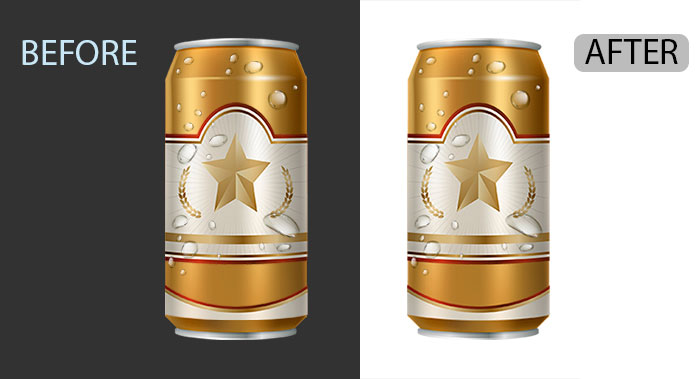
Okay, this next part is super important. You’ve got two ways to edit: destructive and non-destructive.

Think of it like this:

  • Destructive editing is like painting directly on your original photo. Once you do it, that’s it. It’s changed forever.
  • Non-destructive editing? That’s more like putting a transparent sheet over your photo and making all your changes on that sheet. You can always take it off or change it. The original photo stays safe. And that’s exactly why pros stick with non-destructive edits for as long as they can, saving those permanent, pixel-level changes for the very last step.

Pixel editing and parametric image editing

Digital photo editing uses two methods. These methods change images differently. One method alters pixels directly. The other method records editing steps.

What is pixel editing?

Pixel editing changes the image file permanently. This method is destructive. You alter the actual pixels. It allows extremely detailed refinements. CMYK color modes require this method.

What is parametric image editing?

Parametric editing records your steps. This method is non-destructive. You keep the original pixels. It allows easy reversals. Start your workflow with these edits.

Examples of photo editing

So we’ve talked about all these tools and techniques, but so what? Why does any of this actually matter? Well, that’s what this next section is all about: editing for real-world impact. We’re going to see how specific workflows; from high-stakes background removal to detailed photo retouching, actually drive real results in totally different fields.

We’re going to dive into how the ghost mannequin effect revolutionizes e-commerce and how photo stitching and panorama editing create those expansive architectural views. We’ll even explore the artistic side, like how to turn a photo into a line drawing. Whether you need to turn a photo into line art for a technical manual or turn photos into line drawings for a creative project, understanding how to convert photos into sketches or a clean photo to a line drawing shows just how versatile these skills really are.

Background removal

What is Photo Editing? Photo Editing Techniques explained!

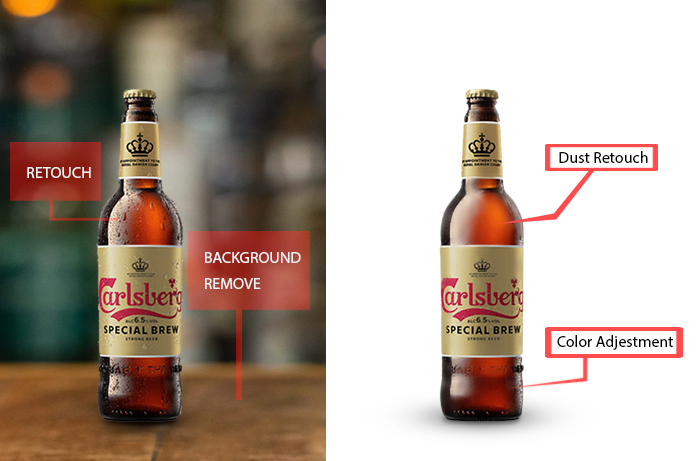
Users learn how to make a background transparent in Photoshop. Precise clipping paths isolate subjects. High-quality background removal improves stores. You create transparent PNG files.

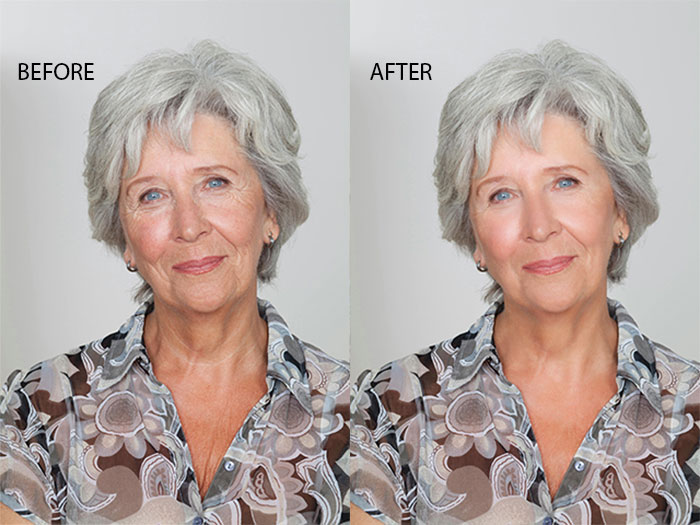
Photo retouching
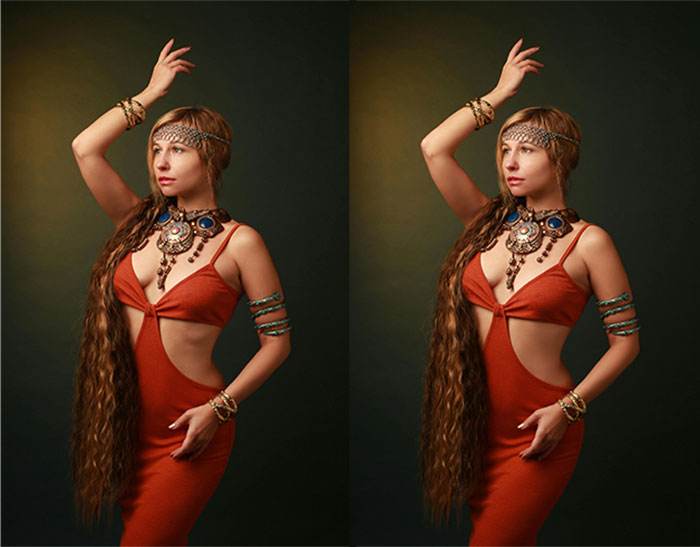
Photo retouching women photo

Professional photo retouching removes fabric wrinkles. Experts perform detailed skin retouching. Editors fix dust spots. Clean images attract more customers.

Ghost mannequin
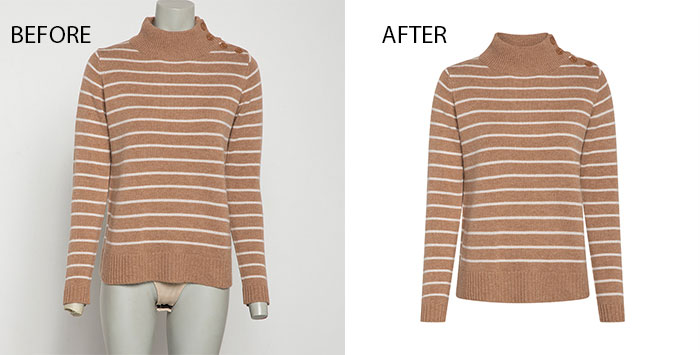
Ghost mannequin

This technique creates invisible person illusions. Editors mask out physical mannequins. You stitch interior shots together. AI tools automate garment reconstruction.
 

Editing different types of photos

Different niches require specific skills. Beginners use cropping for sports photography. This technique improves social media posts. Intermediate editors perform background removal. This skill supports product photography. It helps with product and e-commerce photography needs.

Technique
Skill level
Use case
Cropping, Exposure, Contrast, Saturation, Vibrance
Beginner
Ecommerce, social media, marketing, and headshots
Background removal, Masking, HSL, Healing Brush, Sharpening
Intermediate
Amazon product listings, white background product photos
Retouching, Frequency Separation, Dodge and Burn, Color Grading
Advanced
Portraits, headshots, fashion, jewelry

Experts use advanced retouching for portrait photography. Commercial photography requires high-level polishing. You must understand what portrait photography for fashion is. Professional photography for products uses clean backgrounds. Clients value what is commercial photography for jewelry ads. Every project needs the right skill level.

Photo Editing of Product and e-commerce

product photo editing

Let’s start with e-commerce. When you’re shopping for pictures to sell online, the product photography is, well, it’s everything…

Get ready for this number. 64%. That’s a huge number, right? 64% of all product returns happen because of one single thing: the item just didn’t look like it did in the photography for products shown on the site.

And that makes one particular editing technique absolutely 100% critical. And that’s getting the color right. Accurate color correction is a must in product photography…

Of course, there are other big ones too, like putting pictures to sell online on a clean white background… retouching away any little speck of dust or wrinkle to make your photography for products look its absolute best.

  • Brightness and exposure

You adjust lighting post-shoot. Editors fix dark photos. Proper exposure reveals hidden details. Bright images look professional.

  • Background removal

Amazon requires white backgrounds. This edit maintains visual consistency. You isolate the subject. Pure backgrounds remove distractions.

  • Color correction

Accurate photos reduce returns. You match items to reality. Correct tones manage customer expectations. True colors build trust.

  • Color change

Editors modify product hues. You show all color varieties. One photo serves many options. This saves photography costs.

Photo Editing of Sports

Photo Editing of Sports

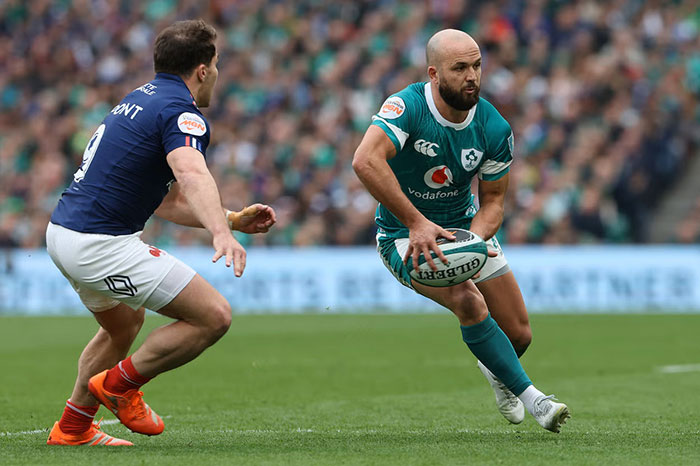
Of course, let’s completely switch gears now and jump into a totally different world, sports photography…

It’s really all about one thing here: focus. Editors will crop in super tight… sharpen the image… Get rid of distracting stuff in the background… Use spot retouching…

  • Cropping

You reframe the action. Tighter crops add intensity. This technique highlights key players. Dramas increase with better framing.

  • Sharpening

Editors fix motion blur. This process improves focus. Crisp details look professional. Sharp images feel realistic.

  • Color correction

Stadium lighting varies constantly. Post-shoot edits ensure accuracy. Consistency improves brand quality. True colors reflect reality.

  • Background cleanup

You remove crowd distractions. This process isolates athletes. Clean surroundings focus the viewer. Subjects stand out perfectly.

  • Spot retouching

Editors clean jersey wrinkles. You remove sweat spots. Professional retouching strengthens visuals. Media brands require clean photos.

Photo Editing of Headshots and portraits

Photo Editing of Headshots and portraits

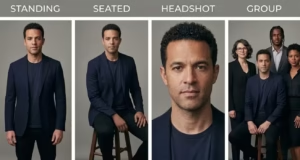
And now for maybe the most personal type of photo editing out there, the portrait and high-end headshot…

The name of the game here is beauty enhancement, not a total transformation of the portrait shot. We’re talking about natural skin smoothing, softening a few blemishes while keeping the natural skin texture intact; rather than over-processed face sculpting. It’s about beauty retouch techniques like subtly making teeth a little whiter and eyes a little brighter, or getting rid of those annoying flyaway hairs. This balance is especially critical for professional women’s headshots, where you want the subject to look polished and confident while still looking like themselves.

  • Skin retouching

Editors reduce facial blemishes. Smooth skin maintains natural texture. Uniform tones improve portraits. This process creates professional looks.

  • Whitening teeth and eyes

Bright smiles attract viewers. Clear eyes pop naturally. Subtle edits enhance expressions. Subjects look healthy.

  • Color correction

Flattering tones match brand aesthetics. Realistic colors ensure quality. Editors adjust skin warmth. Consistency improves final galleries.

  • Flyaway removal

Retouchers clean stray hairs. This action removes distractions. Lint disappears from clothing. Final images look polished.

  • Background editing

Simple backgrounds suit corporate headshots. Lifestyle portraits require specific contexts. You replace distracting scenes. Subjects gain better focus.

Learn how to edit your photos

And you know, that really brings us to the core idea, the guiding philosophy behind all truly great photo editing.

Enhance, don’t just fix. Whether you are learning how to edit your photo in Photoshop or looking for image editing ideas on your phone, it’s not just about fixing what’s wrong with a photo. It’s about taking a good photo and making it great by enhancing its story. This is how photographers edit photos to create an emotional connection.

The photo editing advice you’ll hear from the pros is always the same: the goal is to present someone in their best light while keeping the photo true to who they are. You can achieve good photo edits using high-end professional photo editing software or even a commercial-free program for photo editing.

Even if you’re just looking for the best app for editing pics on iPhone, the same ideas for editing photos apply. By mastering a few Photoshop tools or using your favorite photo editing app, you can learn how to edit photographs like a professional while maintaining that essential authenticity.

Photo editing History

Photo manipulation began in 1846. Early photographers used India ink on negatives. Darkroom experts practiced manual dodging. They used physical airbrushing for skin. Adobe Photoshop 1.0 launched in 1990. Digital pixels replaced chemical processes. Layers arrived in 1994. Modern AI now reconstructs images instantly. Machine learning drives generative fill tools. History combines analog artistry with digital power.

What is a professional photo editor?

Many people ask what a photo editor does today. These experts manage post-production workflows. They establish a consistent visual voice. You might wonder what a photo editor does for brands. They handle advanced photo correction services.

Specialists provide ghost mannequin effects. What do photo editors do to save time? They act as AI directors. Professionals use professional photo editing software. People ask what photographers use to edit their photos for quality. Most experts choose Adobe Photoshop. What do photographers use to edit pictures for color? They prefer Lightroom. What does a picture editor do for quality control? They review every technical detail.

FAQs on What is photo editing?

Can I edit a photo for free?

You can find photo editing software free online. Photopea works in your browser. GIMP serves as a photo editor free for PC users. Darktable handles RAW files without cost.

How can I edit a picture image?

Good photo editing follows specific steps. You import the file. You adjust the brightness levels. You crop the edges. This photo editing how-to guide ensures quality.

What is photo editing on a computer?

Desktop users perform what are image editing tasks. You manipulate digital pixels. Computers process raw camera data. AI tools expand existing image borders.

What is photo editing in journalism?

Photojournalism editing follows strict ethical rules. Editors forbid object removal. You only adjust basic colors. Clear labels identify AI enhancements.

What is a photo editing app?

Mobile users download photo editing software. Snapseed offers professional tools for free. PhotoRoom automates product shots. These apps allow quick mobile edits.

Final Thought

So that leaves us with one final and really crucial question to think about. We’re living in an age of AI, right? Where powerful tools can change an image in just a few seconds.

So where do we draw the line? When does photo enhancement cross over into digital deception? It’s a huge question, and it’s a conversation that we’re all going to be having as this technology just keeps getting more powerful. Thanks for tuning in.

If you want to get your picture get edited by experts, then the experts at GraphicXer is here to help you!

Get Free Trial!

Try our free trial . GraphicXer allows you to check if they meet your demands.

You Might Also Like