
Selling on Amazon in 2026 is more visual than ever. Shoppers scroll fast compare faster and make decisions in seconds. Your images do most of the talking which is why Amazon stays strict about product image rules. If you invest in high-quality Amazon product image editing your listing looks trustworthy your conversion rate improves and you avoid painful issues like suppressed listings.
This guide walks you through Amazon product image requirements for 2026 in plain English with practical tips you can apply whether you shoot photos yourself or use a professional editing partner like GraphicXer.
Why Amazon Product Image Requirements Matter In 2026

Amazon’s image rules are not just about aesthetics. They are about consistency buyer trust and reducing returns. A clean accurate main image helps customers understand what they are buying. Clear secondary images reduce questions improve confidence and often increase conversion rate.
On the compliance side Amazon can suppress your listing if the main image breaks key rules. Sometimes it is obvious like a watermark. Sometimes it is subtle like an off-white background that reads as gray or a product that does not fill enough of the frame. Getting this right upfront saves time protects rankings and prevents revenue dips from listing issues.
Amazon Product Image Types You Should Use
Amazon lets you upload multiple images and each one has a job. Think of the set as a mini sales page.
Your first image is the “Main Image” (also called the hero image). It appears in search results and on the product page as the default. The rest are “Secondary Images” and they help answer buyer questions: details size use case included accessories and real-life context.
For most categories you will typically want:
- A compliant main image on a pure white background.
- A few angle shots that show the product clearly.
- One or more lifestyle images showing use.
- A close-up detail shot to highlight texture materials or key parts.
- An infographic-style image with dimensions or key callouts (when allowed and done correctly).
You do not need to use every type on every listing but you do need to cover the main buying objections.
Amazon Main Image Requirements (Hero Image Rules)

Amazon main image requirements are the strictest because this image appears everywhere: search ads recommendations and comparison widgets.
In 2026 the main rules you should follow are:
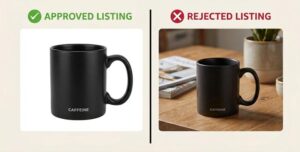
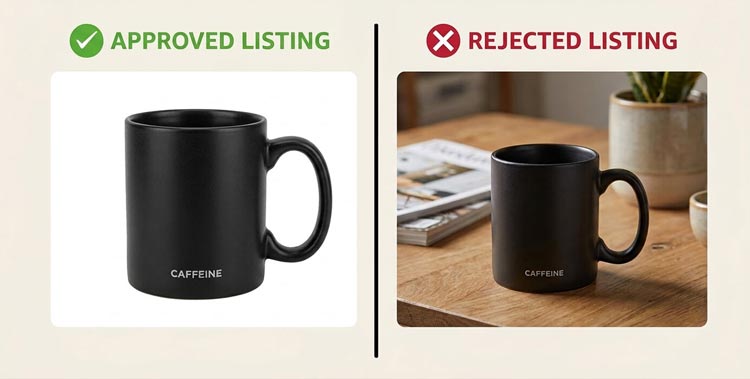
Your product must be the only visible item. No extra props, no decorative elements, and no text. If something is included in the purchase it can usually appear but it must be clear that it is part of the product package and not a staged prop.
Your background must be pure white. Amazon’s standard is RGB 255 255 255. “Almost white” often fails, especially after compression or when viewed against Amazon’s page background.
The product should fill most of the frame. A common best practice is around 85 percent of the image area. If the product looks too small it can appear low quality and may risk suppression.
The image should be sharp, properly exposed, and realistic. Over-editing that changes color or hides product features leads to unhappy customers and returns.
No watermarks, logos, borders, or promotional badges. Even a small brand mark is a frequent reason for suppression.
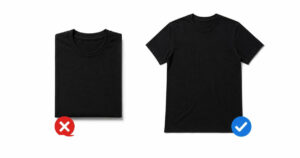
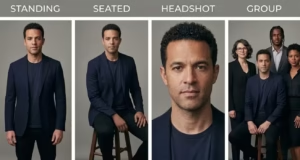
No mannequins for certain categories unless explicitly allowed. Many apparel categories require the item to be shown on a model or mannequin only under specific conditions and often the main image still needs to present the item cleanly without busy styling.
If you only fix one image on your listing make it your hero image. It is the gateway to clicks.
Amazon Secondary Image Requirements
Secondary images are where you sell the experience but Amazon still has boundaries.
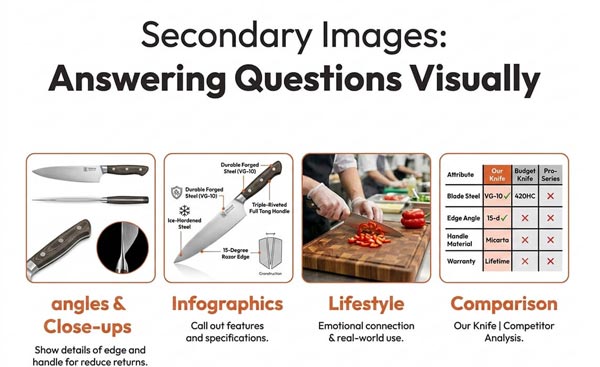
You can typically include lifestyle shots, in-use photos, and close-ups. You can also include comparison visuals, simple callouts, or dimension charts in many categories. The key is accuracy: no misleading claims no fake results and no visuals that imply features the product does not have.
Avoid anything that violates Amazon’s general content policies. For example explicit or shocking imagery, illegal claims, or competitor logos. Also avoid clutter. Even when it is “allowed,” a busy infographic can hurt conversion by making the product harder to understand.
In 2026 Amazon shoppers expect a clean image set. The best secondary images are simple, intentional, and focused on answering one question at a time.
Amazon Image Size Dimensions And File Requirements
Amazon does not enforce one single “magic size” but there are practical minimums and best practices that matter for zoom clarity and ad placements.
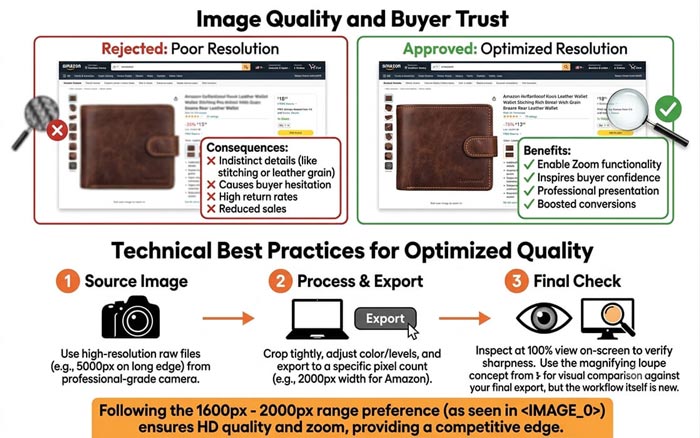
For a strong zoom experience, aim for at least 1600 pixels on the longest side. Many sellers go higher like 2000 to 3000 pixels as long as the file stays reasonable and the image remains crisp. Amazon’s zoom feature typically requires a minimum longest side to activate and images that do not zoom often look less premium.
Keep your image in a supported format. JPEG is the most common and safest. PNG can work, especially if you need lossless quality, but be mindful of file size. Amazon also supports certain other formats in limited contexts but sticking to high-quality JPEG or PNG avoids surprises.
Use the sRGB color profile for consistency across devices and browsers. If your image looks perfect on your screen but strange on Amazon, color profile mismatches are often the reason.
File naming is usually not a ranking factor you should obsess over but clean naming helps you stay organized. Many teams use SKU-based naming for version control especially when running A/B tests on images.
Background Rules: Pure White Means Pure White
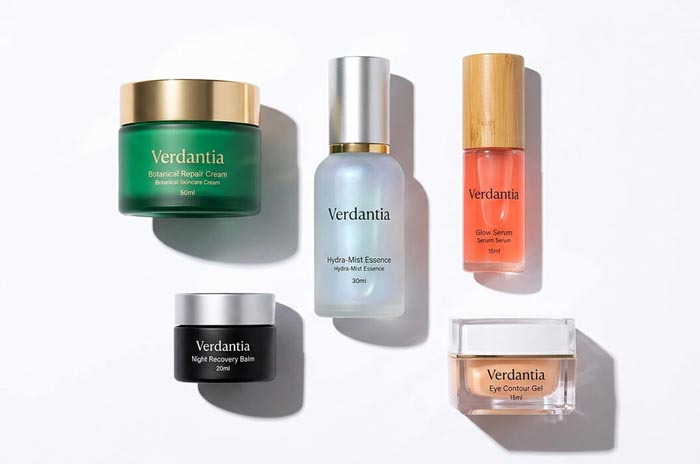
Amazon’s definition of “white background” is not subjective. If you have ever thought “This looks white enough” that is exactly when suppression happens.
A few common mistakes: A slightly gray background caused by poor lighting. A “paper white” look with gradients or shadows that read as off-white. A white background that picks up color from the product, like green or blue spill.
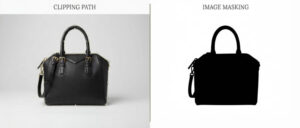
Clean clipping paths and consistent background replacement are the most reliable way to hit true white especially for reflective products like metal glass and glossy packaging. This is also where professional post-production saves hours. You can shoot with a realistic studio setup and then standardize the background in editing without compromising the product.
Product Coverage Cropping and Framing

Amazon wants the product to be the focus but not cramped. Good framing feels balanced.
For the main image, keep the product centered, fill the frame, and avoid cropping off important parts unless it is a deliberate, category-appropriate close-up. If you sell sets or bundles make sure it is obvious what is included, and present the full set clearly without making the image too busy.
For secondary images, you can crop tighter for detail but keep it sharp. If the crop creates confusion about size or what is included, add a separate dimension image to clarify.
One quiet trick that works well is consistency: similar angles, similar scale, and similar lighting across the set. It makes the listing feel premium and increases buyer trust.
Text Graphics And Infographics: What Works On Amazon
Amazon’s main image cannot have text or graphics. Secondary images often can depending on category but you should keep them clean and compliant.
Text works best when it supports clarity not hype. Use it to show dimensions, highlight a key feature, or explain what is included. Avoid exaggerated claims like “Best” “#1” “Guaranteed results” or anything that feels like a banner ad. Even if it passes moderation it can lower trust with shoppers.
If you use icons keep them minimal. Use consistent fonts. Maintain good contrast without making the image look like a poster. And always prioritize the product itself because Amazon is still a marketplace, not a landing page.
If you are unsure whether a graphic is too promotional, test a cleaner version. Simple usually wins.
Category-Specific Image Rules You Should Know
Amazon’s baseline rules apply to most categories, but some categories have additional standards. You do not need to memorize every rule but you do need to double-check your category guidelines before uploading.
Apparel often has specific standards about how items should be photographed how models or mannequins can be used and what the main image should look like. Jewelry often needs high clarity close-ups and accurate color representation because returns are common when metal tones or stone colors look different.
Beauty and personal care images often get flagged if they imply medical outcomes or show “before and after” style results that can be considered misleading. Supplements and health-related products are especially sensitive so keep images factual, product-focused, and policy-safe.
If your category is tightly regulated, treat images as compliance assets not just marketing assets.
Common Reasons Amazon Images Get Rejected Or Listings Get Suppressed
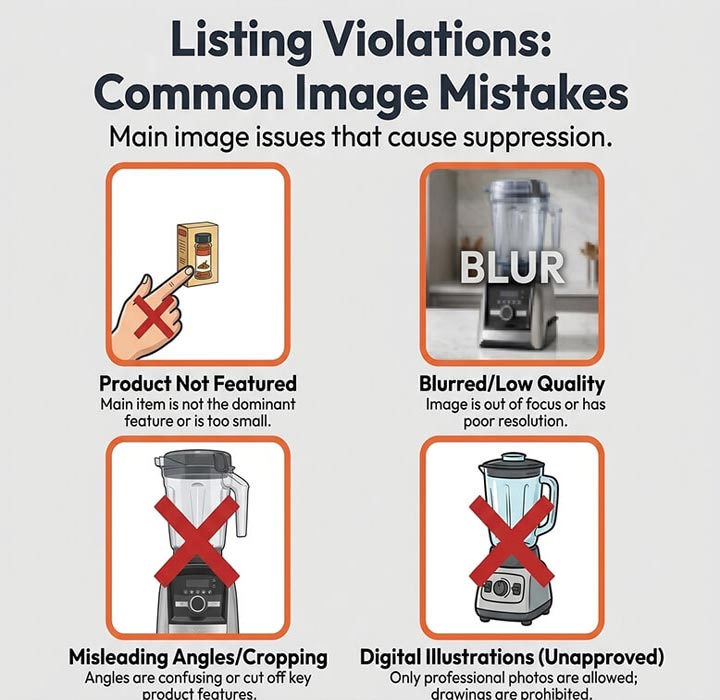
A lot of sellers think suppression only happens to “bad” listings. In reality many good brands get hit because of small technical issues.
The most common triggers include a non-white background on the main image watermarks or logos too much empty space around the product low resolution blurred images or showing accessories that are not included.
Another frequent problem is using images that are inconsistent with the title and variation. For example, if your variation is “Blue 2-Pack” but the main image shows a different color or a different quantity Amazon may flag it and customers will definitely complain.
If you are getting rejections, look at the first image first then check background color values, then check cropping and included items.
Best Practices For Building A High-Converting Image Set
Once you are compliant the next step is performance. The best Amazon image sets do three things: they attract clicks reduce doubts and help customers imagine ownership.
A simple structure that works for many products is: hero image angle shot, and lifestyle. Close-up detail dimensions, what’s included and one more lifestyle or use-case image.
Try to keep each image focused on one message. A single image that tries to explain five features usually explains none.
Also remember mobile shoppers. Most buyers see your images on a phone. If your text is tiny your details are hard to see or your lighting is flat your listing loses impact fast.
Editing Standards That Make Images Look Premium
Good editing is invisible. The product should look real clean and accurate.
Start with color correction and white balance. Then clean dust scratches and sensor spots. Keep shadows natural especially for the main image. Overly heavy drop shadows can look unrealistic and sometimes trigger moderation issues if the background is not pure white anymore.
Retouching should not change the product. It should remove distractions and present the item as it will arrive. If you sell fabric items keep textures realistic. If you sell reflective items manage highlights without making the surface look airbrushed.
For brands scaling on Amazon consistency is the hidden advantage. When every product photo has the same lighting style, background, and editing quality the storefront feels professional, and customers trust the brand more quickly.
Amazon A+ Content And Brand Story Image Tips
If you are Brand Registered A+ Content gives you extra visual real estate. Amazon’s image rules are more flexible there than in the main listing gallery but you still need to keep everything accurate and policy-safe.
A+ is a good place for comparison charts feature breakdowns and lifestyle storytelling. Keep it readable on mobile and avoid huge blocks of text inside images. Use clean typography consistent spacing and images that feel like a cohesive brand system.
Brand Story modules are especially helpful for building trust. If your product is in a crowded category a strong brand story can be the difference between being seen as a generic listing and being perceived as a real brand.
A Simple Pre-Upload Checklist For 2026
Before you upload do a quick check. It takes five minutes and can save days of back-and-forth.
Make sure your main image has a pure white background no text no watermark and the product fills most of the frame. Confirm the image is sharp high resolution and color accurate. Then review secondary images for clarity accuracy and compliance with category policies.
If you are managing many SKUs create a consistent template for angles lifestyle dimensions and infographic styling. It keeps your catalog clean and makes future updates much easier.
Where Professional Editing Fits
If you are selling at scale or if your product is reflective complex or highly competitive professional editing is usually faster and more consistent than trying to do everything in-house.
FAQs
What Is The Minimum Image Size For Amazon In 2026?
Amazon accepts multiple sizes but for a strong buyer experience you should upload at least 1600 pixels on the longest side so zoom works and your images look sharp on mobile.
Does Amazon require a pure white background for every image?
Only the main image must be on a pure white background. Secondary images can use lifestyle backgrounds but they still must be accurate clear and compliant with Amazon content policies.
Can I Add Text Or Icons On Amazon Product Images?
Text and icons are not allowed on the main image. They are often allowed on secondary images but keep them factual minimal and not overly promotional to avoid rejections.
Why Did Amazon Suppress My Listing Because Of Images?
Common reasons include non-white main backgrounds watermarks low resolution too much empty space or showing items not included. Fix the hero image first then re-upload and recheck.
Are Lifestyle Images Allowed On Amazon?
Yes lifestyle images are generally allowed as secondary images. They work best when they clearly show scale and real use without misleading results prohibited claims or competitor branding.
How Many Product Images Should I Upload On Amazon?
Upload enough to answer buyer questions. Many listings perform well with 6 to 8 images including a hero image details lifestyle dimensions and what’s included depending on the product.
Should My Product Fill The Entire Frame In The Main Image?
It should fill most of the frame commonly around 85 percent without looking cramped. If it is too small it looks low quality and may risk suppression due to excessive blank space.
Can I Show Packaging In The Main Image?
If the packaging is part of what the customer receives it can often be shown. The key is clarity and accuracy. Avoid decorative props or packaging mockups that misrepresent the product.
Final Thought
If your images are even slightly off Amazon can suppress your listing, and shoppers will scroll past without a second thought. We do not want that for you.
At GraphicXer we help brands clean up standardize and optimize product images with fast turnaround and consistent quality so your listings look trustworthy and sell confidently. Send us a few samples and we will show you exactly how much better your catalog can look.